
Minisforum MS-02 Ultra + RTX PRO 4000 Blackwell SFF: Power scaling & LLM benchmarks from 70W to 90W
I wanted to know how much the 70 W cap on the RTX PRO 4000 Blackwell SFF holds it back in the MS-02 Ultra, so I measured it step by step on a local LLM. Short version: 90 W plus a memory overclock got about 26-29% more throughput than stock, with GPU temps in the mid 70s C.
This card has no aux power connector. Everything above 70 W comes through the PCIe slot, and 90 W is over the 75 W slot spec. Read the caveats before you copy any of this.
Full system specs
| Part | Detail |
|---|---|
| Chassis | Minisforum MS-02 Ultra, BIOS 1.04 (2026-04-21), internal 350 W PSU |
| CPU | Intel Core Ultra 9 285HX, 24 cores |
| RAM | 128 GB: 4x 32 GB ADATA DDR5 SO-DIMM (rated 4800), running 4400 MT/s with all four slots filled |
| GPU | NVIDIA RTX PRO 4000 Blackwell SFF, 24 GB GDDR7, VBIOS 98.03.AA.00.02, stock 70 W, slot-powered only |
| GPU link | PCIe 5.0, x8 electrical |
| Storage | WD_BLACK SN8100 2 TB (Gen5), Kingston OM8PGP4 1 TB (Gen4) |
| OS | Debian 13.7, kernel 7.2.9, Secure Boot ON |
| Driver | NVIDIA open kernel modules 615.71.10, CUDA 13.4 |
| Inference | llama.cpp (official CUDA container, build 11804), Qwen3.8-27B iMatrix NVFP4 with MTP draft head |
| Server flags | -c 262144 -ctk q4_0 -ctv q4_0 -b 512 -ub 256 --ctx-checkpoints 4 --fit off --spec-type draft-mtp --spec-draft-n-max 1 --spec-draft-backend-sampling |
What I did, in order
- Baseline at stock 70 W, twice, to measure run-to-run drift (0.2-0.6%).
- Clock offsets at 70 W through NVML (
nvmlDeviceSetClockOffsets, works on stock firmware): memory +5%, core +180 MHz, core +300 MHz. - Backed up the VBIOS. NVFlash
--savewrote a 0-byte file on this card, and sysfs only gives the 162 KB option ROM. I captured NVFlash’s read buffer with gdb instead, which gave the full 4 MiB EEPROM. The read needed kernel lockdown off, so I disabled shim validation once withmokutil --disable-validation, read the chip, and turned it back on. That was the only time Secure Boot was relaxed. - Edited 7 power fields in one bank of that image with the Vix Editor CLI: board power ceiling and rated power, slot power max and rated, and three 12 V input-current limits. No voltage fields. A full re-read of all 122 fields showed only those 7 changed.
- Built the patched NVIDIA open modules (Vix Loader’s 615 patch on the 615.71.10 source) and signed them with my existing MOK key.
- Loaded the edited image into memory, never into the EEPROM: unload the stock modules,
insmodthe patched ones with the image passed as a per-GPU registry option.nvidia-smithen allowed the new limit. Edited images keep a mismatched signature, so never flash one. - Stepped the limit: 80 W, then 90 W. Each step got the same short bench and then a 30-minute sustained load, watching Xid, PCIe AER, temperature and output hashes. I stopped at 90 W on purpose.
- Memory overclock at 90 W: +10%, then +20%.
- Made it reload on every boot: a depmod override so the patched modules win on this kernel only, a modprobe.d file for the image, and a small systemd oneshot that sets 90 W and the memory offset only if the 90 W image actually loaded. A kernel or driver update falls back to stock 70 W. Proven across a reboot.
- Turned on VRAM ECC live (
nvidia-smi -e 1plus a GPU reset, no reboot) and kept running real work on it.
Benchmark
Each run: 3 short decodes (768 tokens), then 3 cold 32K-token prefills each followed by a 512-token decode. Means of 3. Every run gave byte-identical output, and none logged a GPU (Xid) or PCIe (AER) error.
| Profile | Short decode tok/s | 32K prefill tok/s | Decode @32K tok/s | Core clock (decode) | Peak GPU temp |
|---|---|---|---|---|---|
| 70 W stock (avg of 2 runs) | 32.69 | 920.7 | 28.43 | ~970 MHz | 67-68 C |
| 70 W, memory +5% | 32.15 | 919.4 | 28.55 | 832 MHz | 69 C |
| 70 W, core +180 MHz | 32.83 | 934.1 | 28.77 | 1012 MHz | 68 C |
| 70 W, core +300 MHz | 33.03 | 930.0 | 28.73 | 1072 MHz | 67 C |
| 80 W | 34.95 | 1029.3 | 31.48 | 1485 MHz | 70 C |
| 90 W | 35.53 | 1109.4 | 32.76 | 1710 MHz | 73 C |
| 90 W, memory +10% | 38.80 | 1139.6 | 35.00 | 1582 MHz | 75 C |
| 90 W, memory +20% | 41.26 | 1158.9 | 36.64 | 1447 MHz | 74 C |
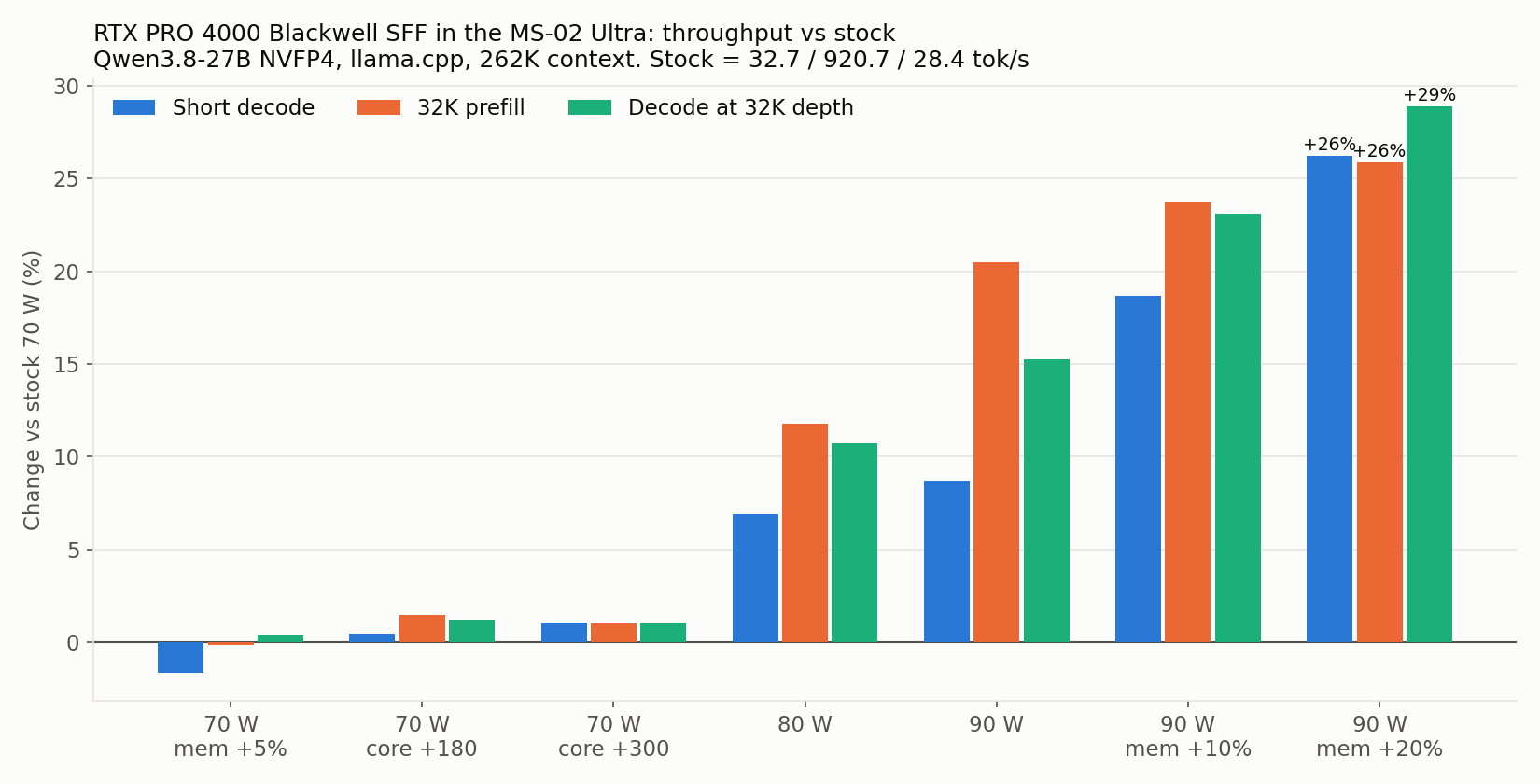
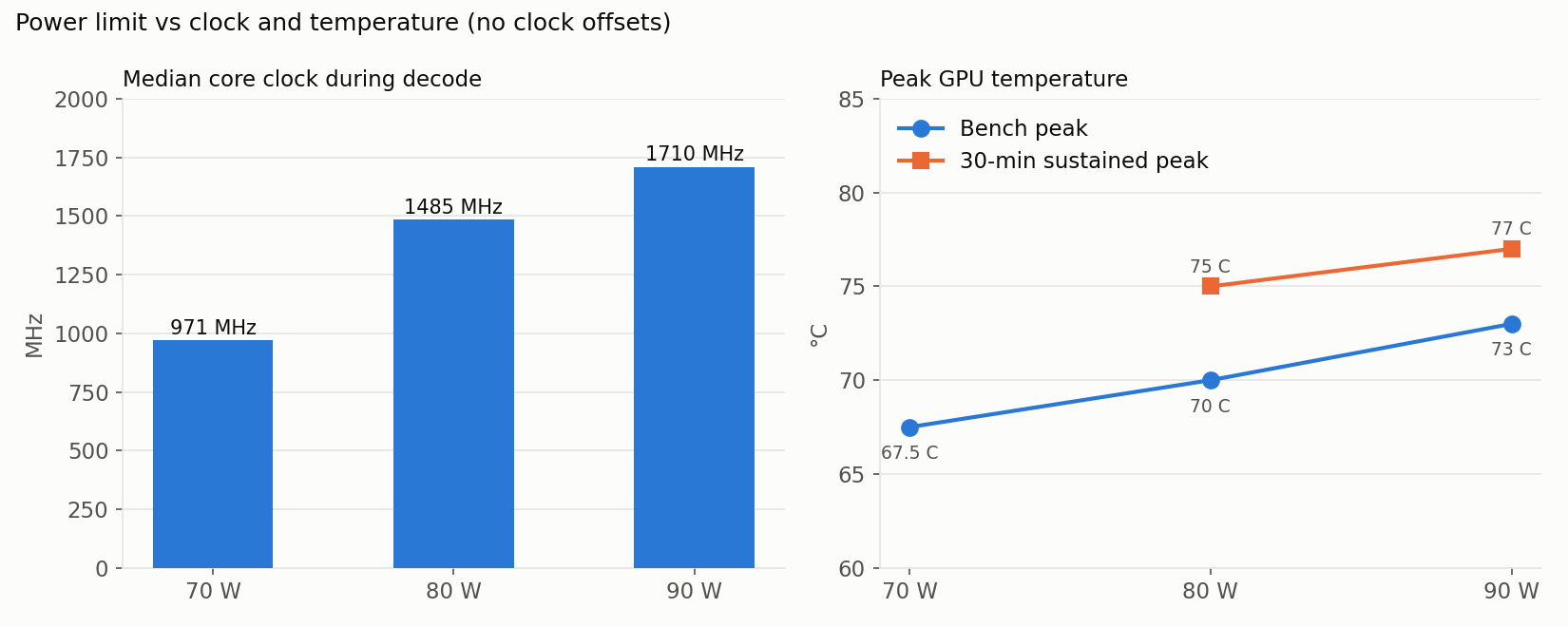
vs stock, the best profile is +26% short decode, +26% prefill and +29% decode at 32K depth.
30-minute sustained runs (back-to-back cold 32K prefill + 512 decode):
| Limit | Requests | Prefill start → end | Decode | Peak temp | Avg power |
|---|---|---|---|---|---|
| 80 W | 38 | 1024 → 1019 tok/s (-0.5%) | 31.4 tok/s flat | 75 C | ~79.5 W |
| 90 W | 40 | 1108 → 1089 tok/s (-1.7%) | 32.7 tok/s flat | 77 C | 89.1 W |
What I learned
- At 70 W the card is power-capped the whole time. The core sags to about 1 GHz under load.
- Overclocking at 70 W is nearly pointless. A memory offset just steals watts from the core. A core offset acts like an undervolt and buys about 1.5%, and +300 adds nothing over +180.
- Power is what matters. 70 to 80 W gave +10-12% on prefill and deep decode. 80 to 90 W gave another +8% prefill, but decode started to flatten.
- Once power isn’t the limit, memory is. At 90 W, +20% memory gave +12% decode even though the core clock dropped 15%.
- NVML offset units trip people up. The memory offset is in double-data-rate units: +1800 is about +10%, +3600 about +20%. My kept setting of +3598 reads 10800 MHz.
- With VRAM ECC on under real load at the final profile: 0 corrected, 0 uncorrected errors so far.
The slot-power caveat (please read)
- Minisforum states only “standard 75W PCIe slot power” per slot. There’s no published margin, and I found no teardown of the MS-02 Ultra’s slot power path.
- The PCIe spec allows 5.5 A on the slot’s 12 V pins (66 W). 80 W is about 6.7 A, 90 W about 7.5 A, roughly 1.2x and 1.4x spec. Card-edge contacts are datasheet-rated around 1.1 A each.
- Precedent: the RX 480 in 2016 pulled about 7 A through desktop slots with no documented damage. Nothing public covers sustained draw well past that.
- The GPU’s sensors can’t see the slot contacts. With an IR thermometer on the slot surface at 80 W: about 35 C at one end and 55 C at the end next to the CPU cooler (one reading), about 29 C at idle. That’s surface temperature, not pin temperature.
- I would not run 106 or 120 W slot-only in this box.
If you try this, you own the risk. Watch the slot area, keep a stock rollback ready, and never flash an edited VBIOS.
Sources I leaned on
- The original 120 W write-up on this exact card, which mapped the 7 fields and the gdb backup trick: https://piszczek.pl/blog/rtx-pro-4000-blackwell-sff-120w-qwen-benchmark
- NVIDIA VBIOS Vix Loader (patched open modules, in-memory VBIOS override): https://github.com/Panchovix/nvidia-linux-vbios-vix-loader
- NVIDIA VBIOS Vix Editor (
nvbios fields / edit / normalize): https://github.com/Panchovix/nvidia-vbios-vix-editor - NVIDIA open GPU kernel modules, tag 615.71.10: https://github.com/NVIDIA/open-gpu-kernel-modules
- Minisforum MS-02 Ultra base guide (75 W per slot, 350 W PSU): https://github.com/minisforum-docs/MS-02-Ultra/blob/main/Docs/English/02-Ultra-BaseGuide.md
- ServeTheHome MS-02 Ultra review (power connector, 8-pin lead): https://www.servethehome.com/minisforum-ms-02-ultra-review-intel-new-home-lab-king/2
- The model: https://huggingface.co/cdiamond/Qwen3.8-27B-iMatrix-NVFP4-MTP-GGUF
- llama.cpp: https://github.com/ggml-org/llama.cpp
Questions welcome.