
Letting an agent edit DNS through the control panel
zoneedit-mcp is an MCP server that reads and edits the DNS records of a ZoneEdit account. It signs in to the ZoneEdit control panel with a headless Chrome and works the way a person would. This post explains the design: what the server finds out for itself, where the safety lives, what a write goes through, how it is tested without a real account, and what is not proven yet.
Code: github.com/synman/zoneedit-mcp. Version 1.9.2.
DNS is a good job to hand to an agent and a bad job to hand over carelessly. A wrong A record at the apex or a deleted NS row takes a site offline, and the change is out on the internet before anyone looks. I wanted an agent that can read a zone, propose a change, show exactly what would happen, and make the change only when a person says yes.
The shape of it
The records I wanted to edit sit behind the ZoneEdit control panel, so the server drives the panel. A call comes in with a bearer token, the tools plan the write, and one headless Chrome run carries it out.
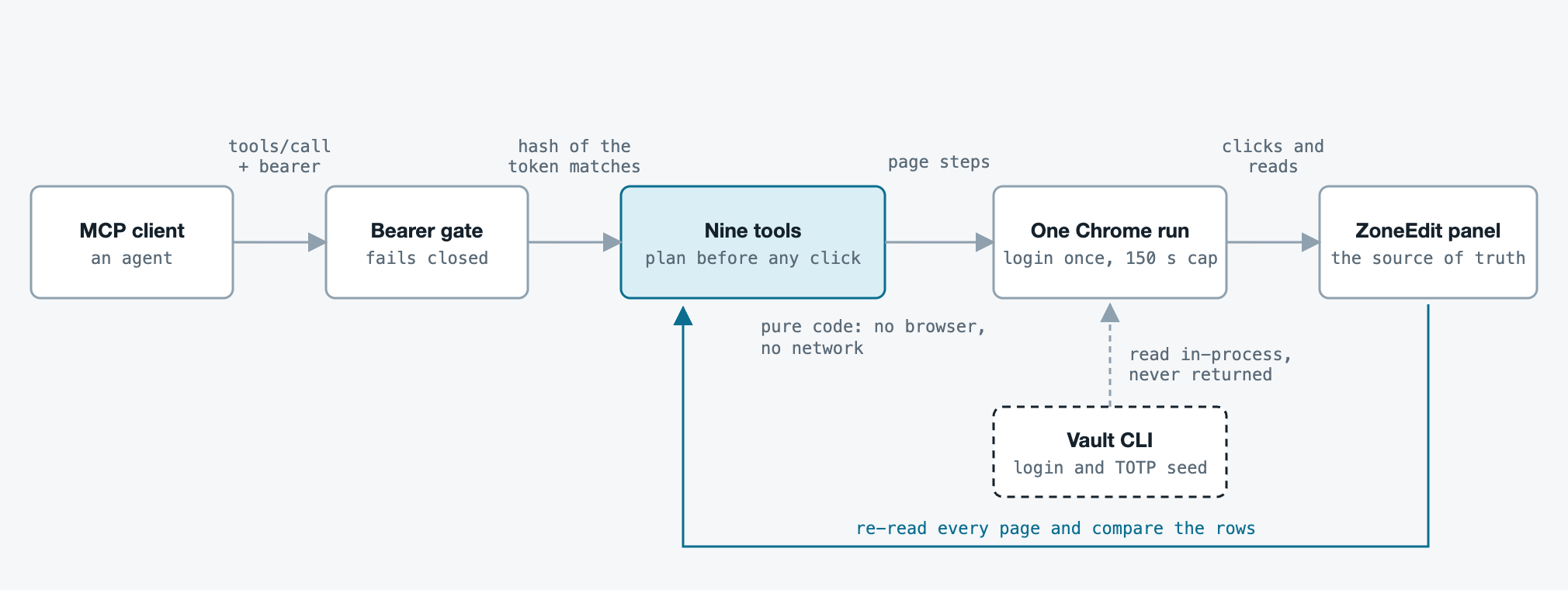
A few rules hold the picture together. The server stores only a SHA-256 hash of the token, never the token. Each call logs in once, and one run holds the browser at a time. A run that is still going after 150 seconds has its browser processes killed. The panel login and the Authenticator seed come from a vault CLI inside the process and are never returned, logged or echoed.
There are nine tools. Five only read (zoneedit_records, zoneedit_selftest, zoneedit_2fa_status, zoneedit_domains, zoneedit_schema). Four can change something (zoneedit_record_add, zoneedit_record_update, zoneedit_record_delete, zoneedit_2fa_latch_clear). The server is about 2,700 lines of Python in eight modules.
Nothing about the account is built in
Only the login is configured. The list of domains, the record types, the form fields of each type, the TTL labels, the editor settings and the zone’s name servers are all read from the panel on every call. On the real account that means 31 record types.
Reading the forms keeps the code short and keeps it honest. A hard-coded list of types goes stale the day the panel adds one, and the field names for a CAA tag or an SRV port would have to be copied into code. Here, a type the panel offers is a type the tools can write. A domain you pass in is checked against the account’s own list before it ever reaches a URL.
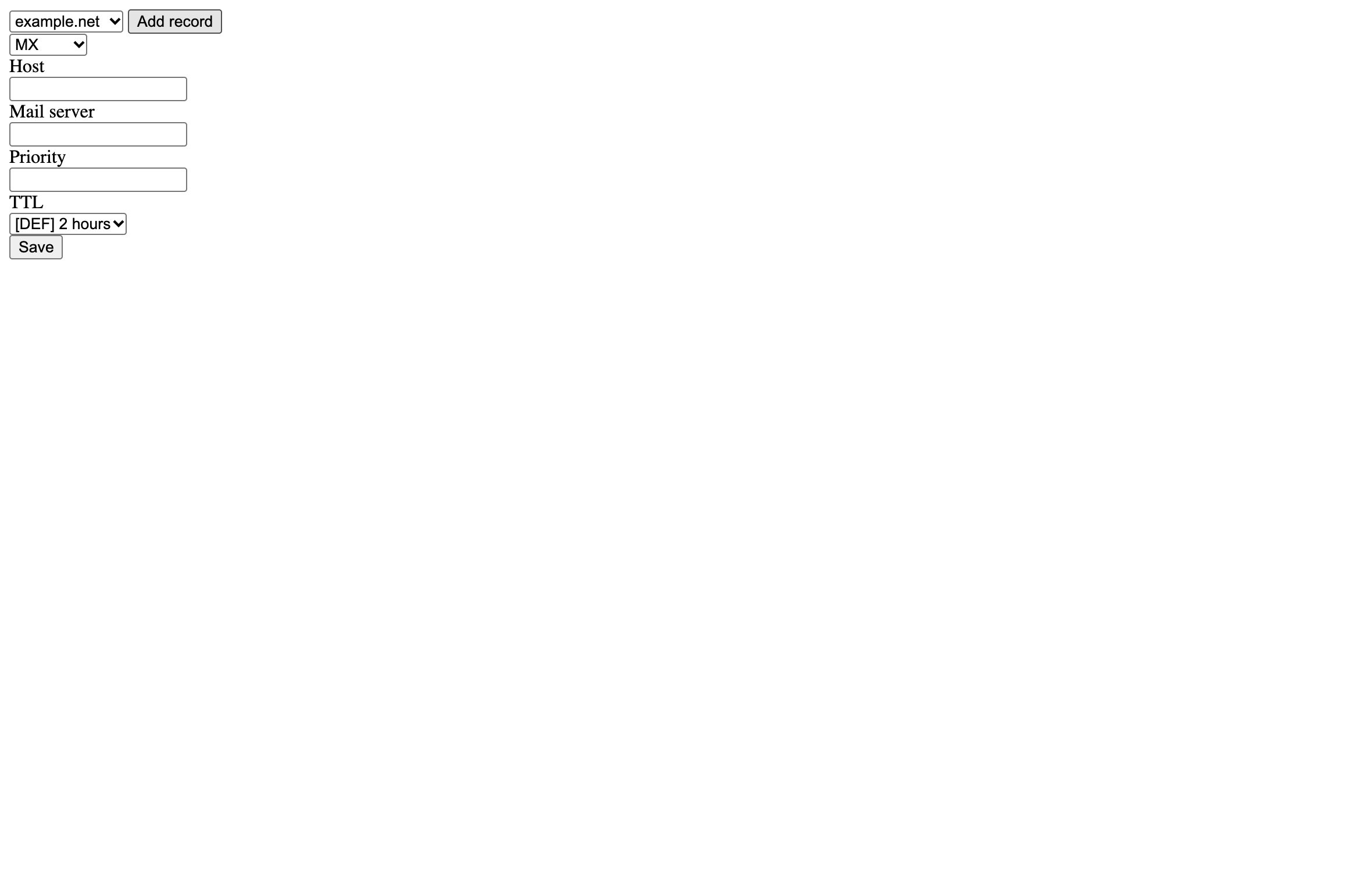
This is what the schema tool returns for an MX record. It was read from the project’s synthetic test page by the shipped code, in a real headless Chrome:
{
  "fields": [
    { "name": "host",    "label": "Host",        "kind": "text",   "required": false },
    { "name": "content", "label": "Mail server", "kind": "text",   "required": true  },
    { "name": "prio",    "label": "Priority",    "kind": "text",   "required": true  },
    { "name": "ttl",     "label": "TTL",         "kind": "select", "required": false,
      "options": ["[DEF] 2 hours", "5 minutes", "10 minutes", "...", "2 weeks"] }
  ]
}
Reads that refuse to pretend
The panel splits a zone over pages and prints a total. The records tool reads every page and compares what it collected with that total. When they differ it says so, instead of returning a short list that looks complete:
{
  "read": 10,
  "panel_total": 28,
  "pages_read": 1,
  "pages_expected": 3,
  "complete": false,
  "warning": "Read 10 of 28 panel records from 1 of 3 pages. Incomplete: the read did not cover the whole zone."
}
That output came from a fixture that holds only page one of three. A write that starts from a partial read is refused (incomplete_read), and an empty result is never taken as proof that a zone has no records. Each record carries the panel’s own hash, and update and delete name a row by that hash or by its exact current content. There is no wildcard and no normalising.
Where the guard lives
The first versions refused by record type and host. NS, SOA and DYN rows could not be written, the apex A could not be changed, and a host that already had a record of the same type could not get a second one. It felt safe. It also meant that a second MX record, a second TXT record for a new service, or a legitimate change at the apex needed a person to leave the tool and use the panel by hand.
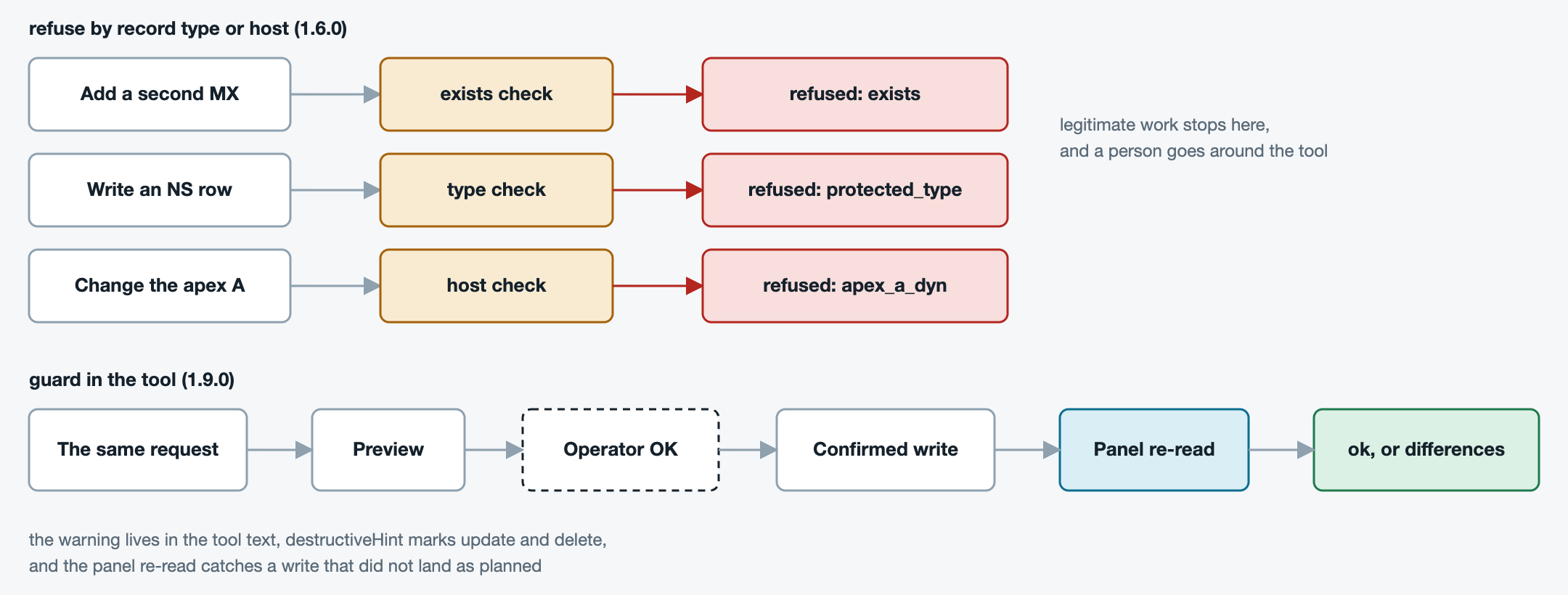
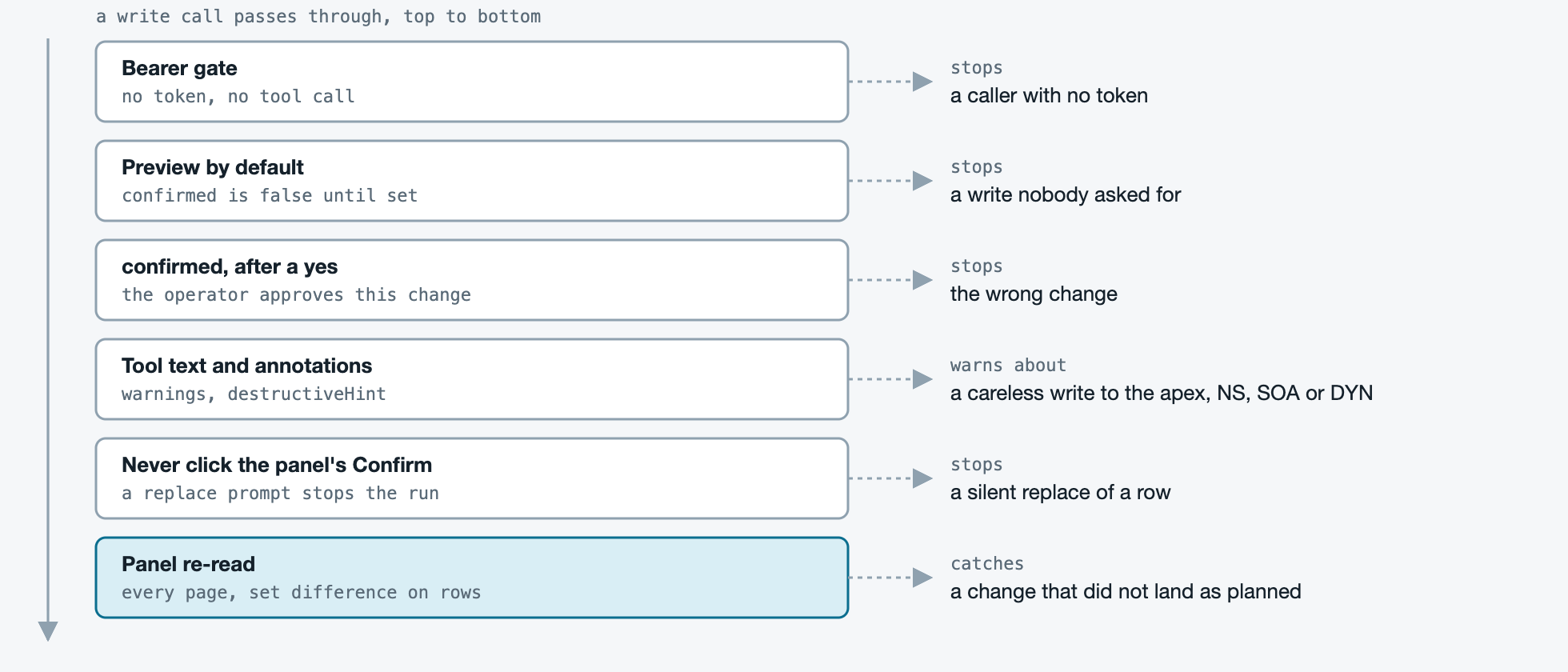
So I moved the guard. The tool no longer decides which rows may be touched. It makes sure that nothing happens by accident, that the person sees exactly what will change, and that a change which did not land as planned is reported as a failure.
- Preview by default. A write tool changes nothing unless
confirmedis true. A preview still logs in, reads the panel and opens the add form to read the type’s fields, but it saves nothing. - A yes for one change. The tool text tells the caller to confirm only on the operator’s word for that exact change.
- Warnings where the caller reads. Each write tool’s description says that the apex
A,NSandSOArows answer for the whole zone and that aDYNrow is kept fresh by an update client.zoneedit_record_updateandzoneedit_record_deletecarrydestructiveHint. - Never click the panel’s Confirm. If the panel asks to confirm a replace, the run stops with
replace_prompt_shown. No code path presses that button. - A refusal that stays. A
CNAMEcannot share a host with another record, and the tool refuses that pair (cname_conflict) in both directions.
Life of a write
A write is a short story with fixed steps. The plan is pure code. It decides every refusal from the type’s live schema before anything is filled in or saved.
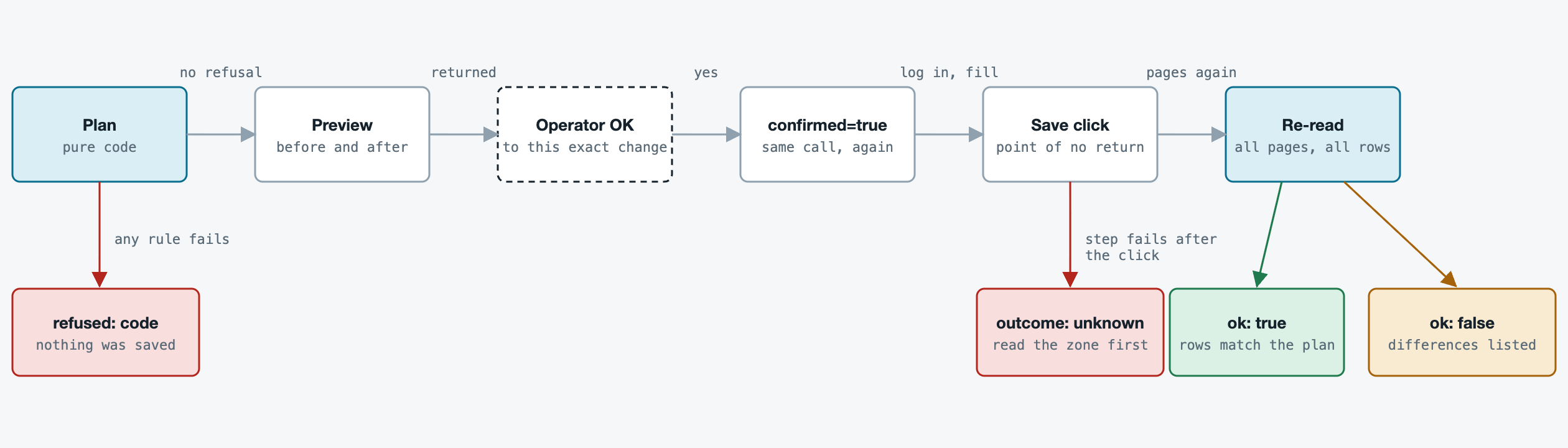
A preview returns what the plan would do:
{
  "ok": true,
  "confirmed": false,
  "action": "add",
  "before": [],
  "after": { "type": "TXT", "host": "www", "content": "v=spf1 -all", "ttl": "", "prio": "" },
  "domain": "example.com"
}
A refusal saves nothing:
{ "ok": false, "action": "add", "refused": "cname_conflict", "domain": "example.com" }
After a confirmed write the server reads every page again and checks the rows against the plan. Every check is a set difference over the row hashes, so it needs no knowledge of the record type. An add must show exactly one new row and no other row lost. A delete must show the target gone and nothing else. A row the panel shows as queued or revoked never counts as done.
This is the check that matters when the panel does something unexpected. Here a fake panel replaced an existing row instead of adding a new one. The record was written, and the result is still a failure:
{
  "ok": false,
  "confirmed": true,
  "panel_verified": false,
  "differences": [ "another row vanished: 1" ]
}
The nastiest case is a failure after the final click. The server cannot know whether the change landed, so it says that and does not guess:
{
  "ok": false,
  "outcome": "unknown",
  "message": "the change may be live; read the zone before retrying",
  "step": "save_button"
}
An unknown outcome is never a refusal and never a reason to retry blind. The caller reads the zone first. After a verified write the server also asks the zone’s own name servers with dig and reports what they answer. That reading is extra evidence only. It never changes ok, because a name server can lag behind a correct change.
One login, and a code page
A repeated failed login can lock a panel account, so a call makes one login attempt and never retries. Some logins end on a code page, and the server answers it itself.
The code is not Google’s. It is a time-based one-time password as RFC 6238 defines it: an HMAC-SHA1 of the current 30-second step, cut down to six digits. The module that does the sum, zoneedit_totp.py, is under forty lines of Python standard library. Google Authenticator is one phone app that does the same sum, and so is any other app that reads the standard QR code. The seed is the whole second factor. A server that holds it needs no phone, no app and no Google account.
Getting the seed takes a few minutes and no special tool. Enroll an Authenticator app on the panel’s Authentication Method page, then read the base32 text after secret= in the otpauth:// link inside the QR code. Decode it offline in your own terminal, because the QR is the whole second factor and an agent transcript is kept in plaintext. Check the seed against an app, store it in the vault yourself, and keep the panel’s one-time recovery code in your own vault too, since using it turns two-factor off. Section 2a of the install guide has the exact steps, the clock check that a wrong code usually points to, and the two calls that prove it end to end.
At the code page the server submits one code and never retries. A code computed in the last five seconds of its step waits for the next step. One process never sends the same step’s code twice, so a preview and its confirmed call cannot reuse one. A rejected code or a failed login latches new attempts for 900 seconds without touching the panel. zoneedit_2fa_status shows the latch and zoneedit_2fa_latch_clear clears it.
One detail came from a library behaviour. Browser automation errors echo the values they filled, which would put a password into an error message. The session keeps only the exception type name and the URL without its query string, and no code path surfaces the text of a browser error.
Testing a tool whose target you cannot ship
There are 479 tests. None of them touches a real account, a real panel or DNS.
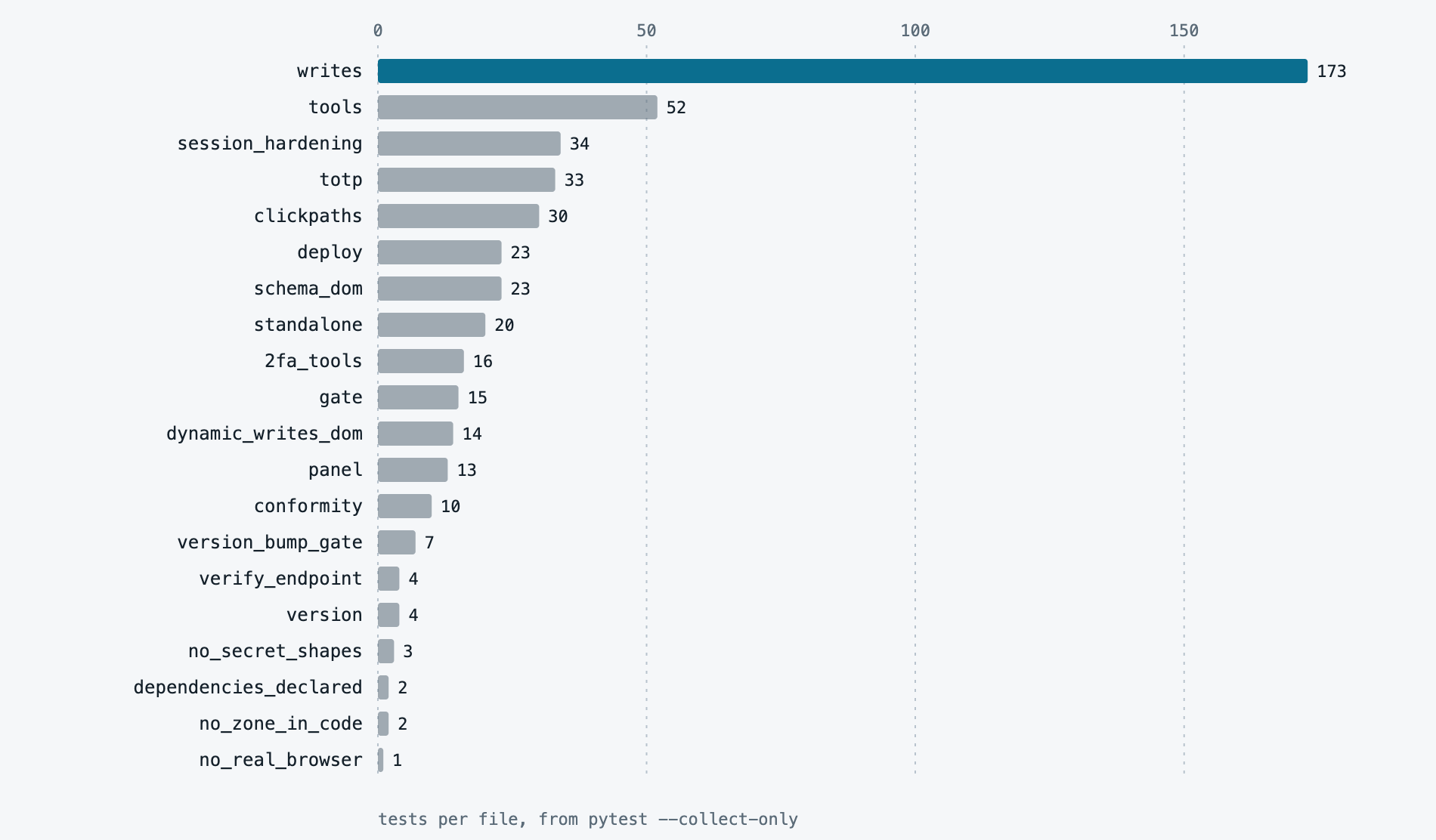
- Synthetic pages. The fixtures are small pages written for the tests, with invented data on
example.com. They hold only the markup the parser and the click steps read. - A real Chrome with the network off. Three test files drive the shipped add, update, delete and schema steps in a real headless Chrome. Every request is aborted except the fixture pages. Small scripts stand in for the panel’s own JavaScript.
- A tripwire. A suite-wide guard turns any accidental real browser launch into a recorded event.
- Secret shapes. A test scans the repository for key and seed shapes. A second one keeps the zone name and the editor URL out of the serving modules.
- A guard is only real if removing it fails a test. When the refusals above were taken out, each replacement was checked by putting the old rule back and watching named tests go red.
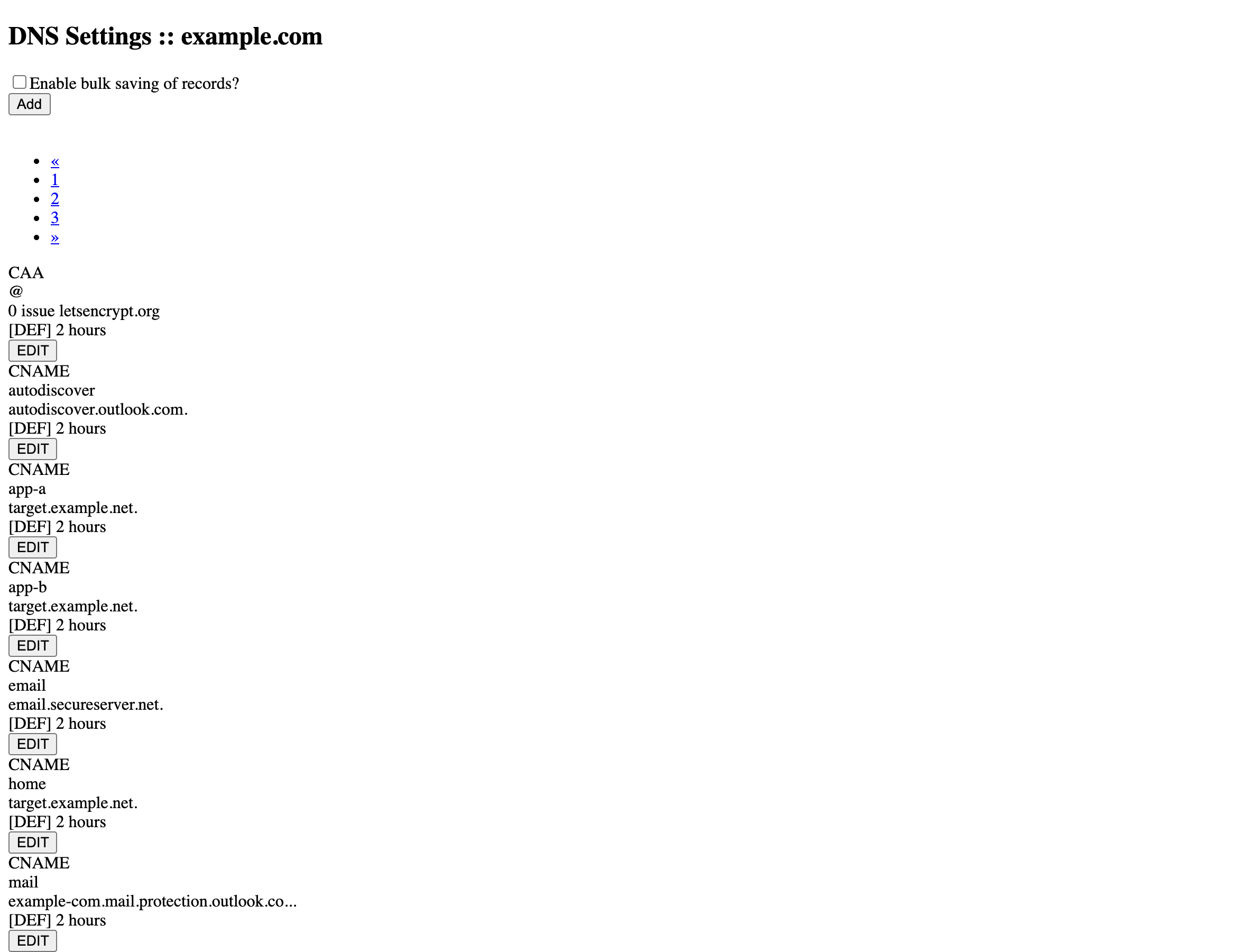
The page looks plain on purpose. It exists to hold the same structure the parser reads, so that a test can change one thing at a time.
What is proven and what is not
This is the part to read before trusting the tool.
| Proven live | Covered by tests only |
|---|---|
| Login, including the Authenticator code page | A write to the apex A, NS, SOA or DYN: planned like any other type |
| The three-page read and the domain list | A confirmed write of any type other than TXT on this version |
| The schema of all 31 record types | The panel’s replace prompt: the code stops at it and refuses |
| Write previews for ten types (A, AAAA, TXT, MX, CAA, SRV, URL, DMARC, PARK, SSHFP) | An outcome: unknown after the final click, forced in the suite |
On 1.9.2, a TXT add, an update, a second add beside the first, and two deletes, each checked by a panel re-read and by both name servers |
|
A CNAME add and delete, on version 1.1.1 |
The last live test ran on 2026-11-03 against a throwaway host and left the zone as it found it: 27 records before and after. The panel kept both TXT rows when a second one was added beside the first, so adding is not replacing. It also kept every untouched row’s hash across an add and a delete, which is what the verification relies on. The right column was run against a fake panel only, never the live one. I did not run those cases live, because the code that carries them is the code that carried the writes above.
How it grew
The first commit and version 1.9.0 are about a day apart, 2026-11-01 to 2026-11-02. The original history was squashed into one commit for publishing, so the steps below come from it and cannot be checked in the public repository.
| Version | What it added |
|---|---|
| 1.0.0 | Bearer gate, read tools, write tools with preview and re-read, version of record |
| 1.1.0 | The Authenticator code answered inside the process, with a login latch |
| 1.2.0 | A deadline for every run and a kill for a stuck browser |
| 1.3.0 | Second factor tools and click path tests in a real headless Chrome |
| 1.4.0 | Domain and schema discovery tools |
| 1.5.0 | The domain and the name servers come from the account on every call |
| 1.6.0 | Add, update and delete driven from the panel’s own schema for every type |
| 1.7.0 to 1.9.0 | The refusals by type and host removed, a second row beside an existing one allowed, and the replace check added |
| 1.9.1 | The tool text corrected to say that a preview opens the add form but saves nothing |
| 1.9.2 | Nothing in the tree names a sibling app, a tool of the workspace or a host. The settings and folders were renamed, and a test scans every file |
Try it
Python 3.11 or newer and Chrome stable are needed. The panel login and the TOTP seed are not passed as arguments or environment variables. The server runs a small script, python <script> get <entry>, and reads the value from its standard output. Any script with that contract works, and it can sit in front of a keychain or a vault you already use. The entries are zoneedit-panel-username, zoneedit-panel-password and, if the panel asks for a code, zoneedit-panel-totp-seed. A quick local run uses stdio:
pip install "mcp>=1.26,<2" patchright && patchright install chrome
ZONEEDIT_SECRETS_CLI=<path to your script> python3 zoneedit_server.py --transport stdio
The repository carries an operator’s guide, an install guide, a troubleshooting guide with every refusal code, and a glossary in docs/. Start with the safe change routine in the operator’s guide, and run zoneedit_selftest once before anything else. If it fails, read the troubleshooting guide before calling it again.
The lesson I would take from this build is small. Put the safety where the person making the decision reads it: in the preview, the tool text and the check after the fact, and not in a list of things the tool refuses to do.